How to detect and download a video using Link Finder Engine from VideoTube Downloader Pro

ChrisPC VideoTube Downloader Pro comes with a powerful automatic video detection engine for major websites like YouTube, Vimeo, Dailymotion, BBC iPlayer, ITV Hub, CBS, ABC, NBC, FOX, Prosieben, Sat1 and many more.

Sometimes the automatic detection will not find a video when you copy/paste your link into the software and it will give you the option to use Link Finder Engine, like in the next image:
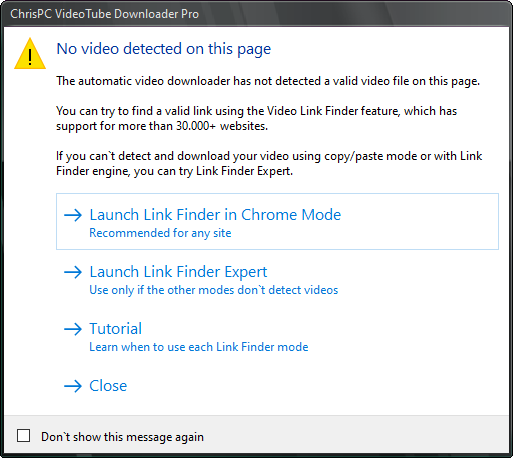
Choose Link Finder Chrome Mode or Link Finder Expert Mode

Here you can choose to Launch Link Finder in Chrome Mode (recommended for any site) or Launch Link Finder Expert (to be used only if other modes don’t detect valid videos).

So what is Link Finder anyway?

To put it shortly, it’s an embedded browser in which you can navigate and play your desired video. The software will try to find a valid download link, which later will download and convert into an MP4 or MKV video file.

Continue reading “How to detect and download a video using Link Finder Engine from VideoTube Downloader Pro”

How to download your favorite videos to watch offline anytime!

Over the last 2 years, we have all been watching a lot of video content online from the well-known streaming platforms (Netflix, Hulu, Peacock, Disney+, Prime Video, HBOMax) and video websites like YouTube, Twitch, Crunchyroll, FuboTv, Tubi, ABC, NBC, CBS,  BBC iPlayer, NationalGeographic, Showtime, TVNow, Zee5, 7Plus, TVNZ, UKTV Play, Channel5, Channel4, RTEPlayer, CMore, Viaplay, Joyn, Roku, Shahid.net, NPOStart, Movistarplus, Vdocipher and many more.

Now that lockdown restrictions were eased and more and more travel restrictions are removed, we can think of traveling much more while remaining connected to our entertainment streams, tutorial videos, documentaries or good old movies all day even if we are off-the-grid 🙂

This is really easy and simple with ChrisPC VideoTube Downloader Pro. Continue reading “How to download your favorite videos to watch offline anytime!”

ChrisPC VideoTube Downloader Pro 🚀 version 14.21.1001 brings Link Finder Expert!

Link Finder Expert is a new powerful feature to be used when no video is detected with the copy/paste mode or with the Link Finder engine.

It’s very easy to use, just navigate to your video and play it. Once a a valid stream or subtitle is detected, the Link Finder Expert download list will show and you can add the streams you want to the download list.

This major version release brings improved detection for videos from Channel5/My5, Channel4, TVNow, TVNZ, threenow, UKTV Play, RTEPlayer, TG4, Atresplayer, NPOStart, 9Now, 7Plus, GlobalTV, CityTV, CTV, VirginPlayer, TF1, Prosieben, 6play, TVAPlus, VRai, MediasetPlay, Showtime, Kijk, Zee5 and many more.

Link Finder engine has been optimized to detect videos from other streaming platforms, such as: AMC, FOX, Syfy, CBC, SBS, ABC iview, TNT Drama, TBS, DR.DK, NRK.NO, PBS
philharmoniedeparis.fr, la7.it, SWR Mediathek, shahid.mbc.net, qub.ca/tvaplus, qub.ca/vrai, tvanouvelles.ca, History, France.tv, Srf.ch Play, STV Player.

Continue reading “ChrisPC VideoTube Downloader Pro 🚀 version 14.21.1001 brings Link Finder Expert!”

Windows 11 version 21H2: All the new features and changes 🚀 October release 📆

The world’s most popular desktop operating system is getting a major overhaul with the unveiling of Windows 11.

Much of the work is interface redesign rather than actual features, Windows 11 is more familiar than you may expect, despite some rearranging and updating the furniture. It borrows from Chrome OS, though you can still place app icons on the desktop background, which Google’s lightweight desktop OS doesn’t allow.

Microsoft will release Windows 11 starting October 5, 2021 on new machines. Updates to existing Windows 10 users should start coming at the start of 2022, and Microsoft hopes to have offered Windows 11 to every compatible machine by mid-2022.

At the time of writing this, the current Windows 11 version is 22000.160 released in August 2021.

Continue reading “Windows 11 version 21H2: All the new features and changes 🚀 October release 📆”

Winter is coming….Windows 10 version 1903 (19H1): All the new features and changes 🚀 Next release 📆

Yes, I know! “Winter is coming…” it’s from a well  known TV series (aka Game of Thrones) which will have the last season in April 2019.

At same time, Microsoft plans to release the next Windows 10 version. Let’s hope is not the last one for them 🙂

This new feature update for Windows 10, known as version 19H1 is packing lots of new features and improvements to the OS and user experience.

Microsoft is now hard at work on this update, expected to include yet more changes and new features such as Windows Sets, and further UI refinements, and improvements.
Development has only just started, so the changelog for this release is still pretty small. We expect more to be added over the next few weeks and months.

At the time of writing this, the current Windows 10 version is 1809 released in October 2018, which is similar to the Red Wedding, lots of bugs and blood :))

Continue reading “Winter is coming….Windows 10 version 1903 (19H1): All the new features and changes 🚀 Next release 📆”

Tomb Raider Movie is out and Shadow of the Tomb Raider Game announced! How to improve your game experience and your internet connection?

Tomb Raider movie was just premiered a few days ago.  Lara Croft is the fiercely independent daughter of an eccentric adventurer who vanished when she was scarcely a teen.

Now a young woman of 21 without any real focus or purpose, Lara navigates the chaotic streets of trendy East London as a bike courier.  Determined to forge her own path, she refuses to take the reins of her father’s global empire just as staunchly as she rejects the idea that he’s truly gone. Advised to face the facts and move forward after seven years without him.

Continue reading “Tomb Raider Movie is out and Shadow of the Tomb Raider Game announced! How to improve your game experience and your internet connection?”

What is HLS M3U8 ? Learn how to download M3U8 video stream 🎞️ and how to download YouTube live event ✨?

HTTP Live Streaming (also known as HLS) is an HTTP-based media streaming communications protocol implemented by Apple Inc. as part of its QuickTime, Safari, OS X, and iOS software.

It resembles MPEG-DASH (MPD) in that it works by breaking the overall stream into a sequence of small HTTP-based file downloads, each download loading one short chunk of an overall potentially unbounded transport stream. As the stream is played, the client may select from a number of different alternate streams containing the same material encoded at a variety of data rates, allowing the streaming session to adapt to the available data rate. At the start of the streaming session, HLS downloads an extended M3U8 manifest playlist containing the metadata for the various sub-streams which are available.

Continue reading “What is HLS M3U8 ? Learn how to download M3U8 video stream 🎞️ and how to download YouTube live event ✨?”

Windows 10 version 1803 – Redstone 4 – April 2018 🚀 Next release 📆

Windows 10’s Redstone 4 (version 1803) is the next major release set to deliver a new wave of features and improvements. Although we’re still 1 month away from the final release, there has been a number of previews unveiling a number of changes coming to the platform.

There are already confirmations that Window 10 Version 1803 will be followed by Version 1809 & Version 1903. Which simply means that after the release of Window 10 Version 1803 in March or early April, Microsoft plans to release next feature updates in September 2018 and March 2019.

At the time of writing this, the current Windows 10 version is 1709 a.k.a Fall Creators Update released last year, October 2017.

How to check your Windows 10 computer score?

It’s quite simple, just install ChrisPC Win Experience Index software and you will get back the Windows interface that you are already familiar from Windows 7 and Windows 8.

ChrisPC Win Experience Index is a free software for non-commercial use.

You can improve your computer graphics, gaming performance, internet connection speed with our software: Chris-PC Game Booster

Manage your computer memory and pagefile usage more wisely than before by changing Windows default behavior with our new software: Chris-PC RAM Booster

What is MPEG-DASH 🎬? How to download MPD video files 📺?

Nowadays many sites start using the MPD manifest instead of well known M3U8 and F4M.

Dynamic Adaptive Streaming over HTTP (DASH), also known as MPEG-DASH,  is an adaptive bitrate streaming technique that enables high quality streaming of media content over the Internet delivered from conventional HTTP web servers.

The multimedia file is partitioned into one or more segments and delivered to a client using HTTP.  For the client, aka video player, to know each segment position, a media presentation description (MPD) file describes segment information: timing, URL, media characteristics like video resolution and bit rates.

How to download MPD manifests?

Continue reading “What is MPEG-DASH 🎬? How to download MPD video files 📺?”

Get Windows Experience Index (WEI) score on latest Windows 10 using free software

ChrisPC Win Experience Index is a free software that brings bag the Windows Experience Index on your Windows 10 OS.

Totally convenient, ChrisPC Win Experience Index runs on any Windows version on 32 or 64 bits, but aims to be used mainly for Windows 8.1 and Windows 10.

On some computer configuration the Windows System Assessment Tool – WinSAT might fail to calculate the WEI score so no ratings will be shown by ChrisPC WEI. In this case click on “More details” button and see where the assessment fails.

Continue reading “Get Windows Experience Index (WEI) score on latest Windows 10 using free software”