Software Details
Using ChrisTWEAK you can tune and optimize your capture device(s) driver settings and more.
While using your favorite capture software or TV application, ChrisTWEAK lets you change any setting in the capture device driver in order to improve TV experience, such as :
- Image settings (brightness, contrast, saturation, hue, sharpness)
- Video standard ( PAL, NTSC, SECAM etc.)
- Image Prefilter Settings (Dynamic Noise Reduction) available only for Hauppauge PVR 150/250/350/USB2/500, ATI Theater 550 PRO, TV Cards with Blackbird and Falcon Conexant Chipset ( Leadtek PVR 2000, Prolink Pixelview PlayTV@P7000, Provideo PV258 Series and others).
- Sound mode (mono, stereo or dual)
- TV channel number and country channel table
- Video and audio input
You can adjust these settings without having your TV application or capture software running.
The supported capture devices that can be tweaked are :
- TV Cards with compatible WDM Driver
- TV Cards with MPEG Hardware Encoder
- Graphic Cards with Video Input (VIVO)
- Combo Cards (Graphic Card and TV Card)
- WebCams and other compatible devices.
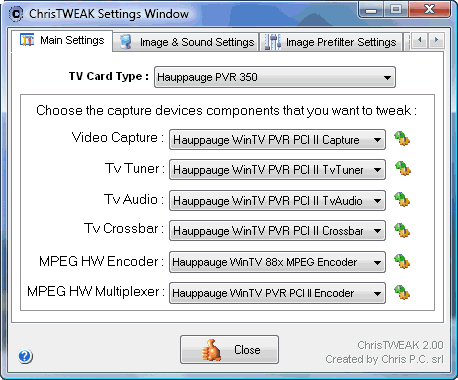
ChrisTWEAK Main Settings
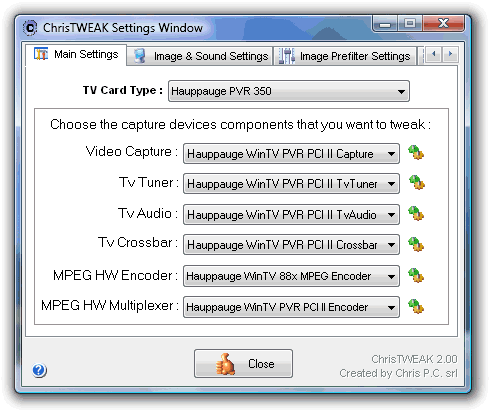
In Main Settings panel you have access to your capture devices driver settings. Below you will find a step by step tweak example:
1. You have to choose the TV Card type you want to tweak :
- Generic TV Card without MPEG Hardware Encoder
- Generic TV Card with MPEG Hardware Encoder
- Generic Conexant BlackBird TV Card
- Generic Conexant Falcon TV Card
- Generic TV Card with WIS GO7007SB Chip
- Hauppauge PVR 150
- Hauppauge PVR 250
- Hauppauge PVR 350
- Hauppauge PVR 500
- Hauppauge PVR USB2
- Leadtek PVR 2000
- Plextor ConvertX PX-M402U
- Plextor ConvertX PX-TV402U
- Lifeview TV Walker
- ATI Theater 550 PRO
- ATI TV Wonder Elite
- Sapphire Theatrix 550
- Theater 550 PRO
- MSI Theater 550 PRO
- Visiontek Xtasy Theater 550
Note : if you are using a capture device without a TV module then you should set as TV card type, the first option in the list.
2. Choose the capture devices components that you want to tweak from the apropiate lists and click on the button, next to every list in order to bring the device component property window.
- Video Capture - main capture device settings : image settings, video standard and other.
- TV Tuner - you can change TV channel number and country channel table (available only for devices with TV module).
- TV Audio - set the sound mode (available only for devices with TV module).
- TV Crossbar - choose the sound and video input, like TV, S-Video, Composite (available only for devices with TV module).
- MPEG Hardware Encoder and Multiplexer - you have access to all MPEG Hardware Encoder settings, for example : video/audio bitrate, stream type, frame size etc. (available only for TV cards with MPEG hardware encoder).
ChrisTWEAK Profiles Settings
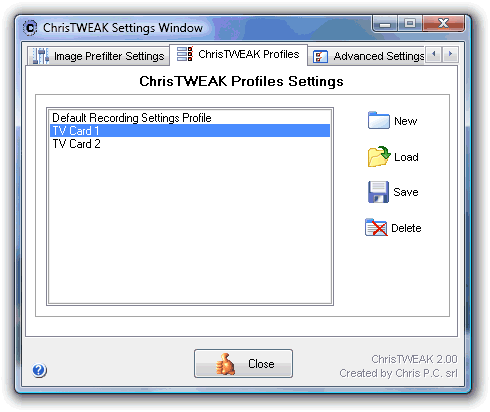
By using ChrisTWEAK profiles, you will be able to save your favorite settings for each of your capture device that you control with ChrisTWEAK and load the settings whenever you need them again.
ChrisTWEAK Advanced Settings
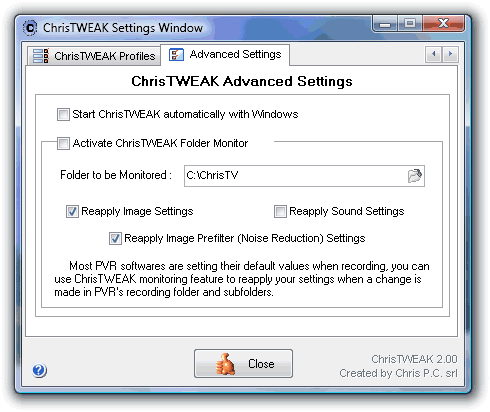
You have the choice to start ChrisTWEAK minimized in systemtray automatically with Windows.
Most Personal Video Recorder (PVR) softwares are setting their default values when recording, you can use ChrisTWEAK Folder Monitoring feature to reapply your settings when a change is made in PVR's recording folder and subfolders.
This features allows you to reapply Image Settings, Sound Settings and Image Prefilter Settings.
Image Prefilter Settings
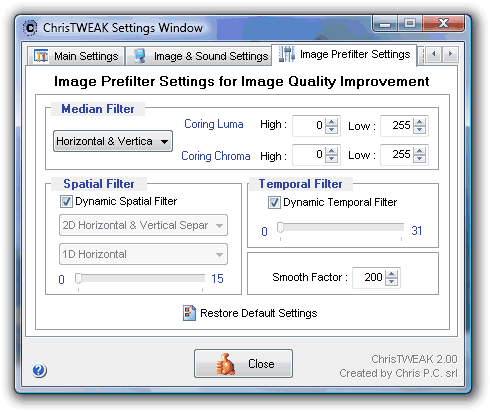
Using the Image Prefilter Settings (Dynamic Noise Reduction) you can improve the image quality and sharpness.
This settings are available only for the following TV cards :
- Hauppauge PVR 150/250/350/USB2/500 series,
- ATI Theater 550 PRO TV cards,
- TV Cards with Blackbird Conexant Chipset (Leadtek Winfast PVR 2000, Prolink Pixelview PlayTV@P7000, Provideo PV258 Series and others),
- TV Cards with Falcon Conexant Chipset.
Is it a Shareware ? Does it have a trial period ?
ChrisTWEAK is shareware software, meaning that you can use it for FREE for a limited time period of 14 days.
After this free trial period you will need to register your copy and benefit of the advantages of a Chris PC's registered user.
How can I get my own registered copy of ChrisTWEAK ?
You can log on Internet at http://www.Chris-PC.com/purchase.html and follow the instructions for purchasing a ChrisTWEAK licence.
Download Now!| Buy it now!